

Not the Assistant Home Assistant. That's a different and frankly less prestigious role, and the distinction matters to this agent more than it does to anyone else.
A2HA is a Pinata agent that does two things for a Home Assistant house: it hands guests a strictly limited set of buttons for exactly as long as they're staying, and it does the fiddly configuration work you keep putting off.
See the overview page → — a one-page explanation you can send to someone who hasn't read any of this.
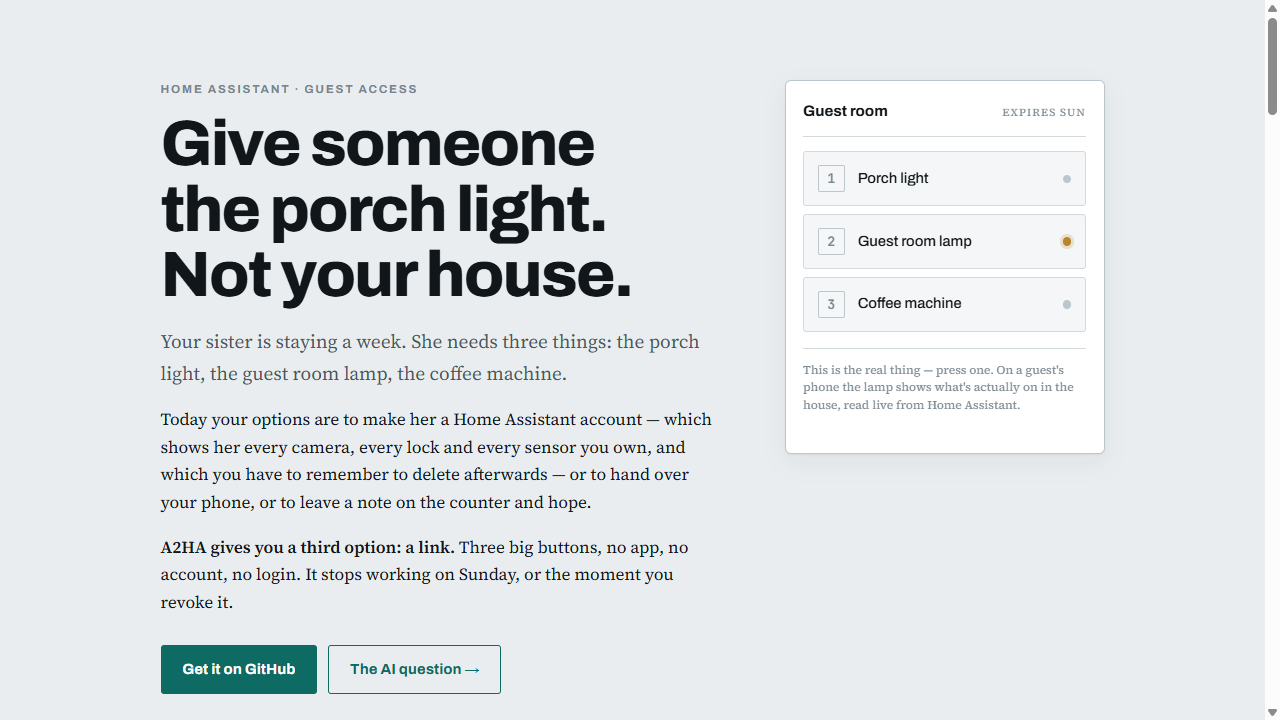
Someone is staying at your place for a week. They need the porch light, the guest room lamp, and the coffee machine.
Your options today are all bad. Make them a Home Assistant account and they can see every camera, every door lock and every sensor in the house — and you have to remember to delete it afterwards. Hand them your phone. Or leave a note and hope.
A2HA gives you a third option: a link.
you:   make a pad for the house-sitter with the porch light,
       the guest room lamp and the coffee machine

a2ha:  Done — three buttons. I tested all three, they actually moved.
       Want a link? I'd go 7 days.

you:   yeah, they arrive Friday

a2ha:  https://your-agent.agents.pinata.cloud/pad/r/a2h1_…
       Porch light, Guest room lamp, Coffee machine. Dies next Sunday.
       Copy it now — I can't show it again.
They open it on their phone. Three big buttons. No app, no account, no login. When the link expires it stops working, and you can kill it earlier from chat in about four seconds.
Worth being precise about, because "limited access" is easy to claim and easy to get wrong.
A guest only ever transmits a button number. There is no text field. There is nothing to type. Nothing a guest sends becomes an instruction to your house — the number selects from actions you defined, and that is the entire protocol.
The page they load contains the button numbers and the labels you wrote. That's it. No entity IDs, no service names, no other pads, no way to enumerate anything.
Once the page is open it asks — in a second, separate request — what those buttons currently are, and a small dot lights next to each. So a guest can see the porch light is already on instead of pressing it and wondering. The HTML itself stays state-free, which means a link preview or a crawler still learns nothing; state only exists for someone who actually opened the page. A button whose state can't be known — a spoken-phrase button, or an unavailable device — shows no dot rather than a confident wrong one.
Some smaller decisions that matter more than they look:
- Loading the page fires nothing. Chat apps fetch links to build previews.
If
GEThad side effects, pasting a link into a group chat would turn on your lights. - Links are stored as a hash. You see the URL once. Nobody — including the agent, including anyone who reads its files — can recover it afterwards.
- Expiry and revocation are checked on every request, not at page load. Kill a link and it dies on the guest's very next tap, mid-visit, instantly.
- A dead link says so politely. Expired or revoked returns a plain "this link isn't active" page rather than a 404 — a forwarded dead link shouldn't look alarming, and shouldn't confirm to a prober that a real-shaped token missed.
- Rate limited per link, so a bored houseguest can't machine-gun your switches.
Pads are cheap. Make one per visitor, or one per situation — the party planning committee gets the speakers and nothing else, the temp gets the front lamp for one afternoon, the neighbour watering your plants gets the garage light for the fortnight you're away.
The second thing A2HA is for is everything you'd otherwise do by clicking around Home Assistant for an hour.
Dashboards. Building a panel by hand is a long afternoon of dragging cards. Ask instead:
"Build a conference room dashboard — the projector, the lights, the blinds and the temperature. Make it my home screen."
It reads what's actually in the room, writes the layout, and points the kiosk at it. It knows which card types your install genuinely renders — including custom ones from HACS — and refuses to invent ones that don't exist.
Automations, scripts and scenes. Written through Home Assistant's config API, so they appear in the UI editor like anything else:
"When the last person leaves, turn off the warehouse lights and set the thermostat back."
Tidying up. The thing nobody ever gets to. Ask what's unavailable, what's duplicated, what's named badly, what hasn't reported in a month — then have it fix them.
The small stuff that's disproportionately annoying. Adding a weather card.
Creating helpers. Renaming forty entities that arrived from an integration
called things like sensor.0x847127fffe_battery. Working out which automation
is firing at 3am.
Everything destructive is snapshotted first, with a one-command undo. It won't delete anything without telling you what's being lost.
A short list, because a tool that's honest about its edges is easier to trust.
- It can't change what dashboard your login sees. Home Assistant stores that per user, and the agent can only set its own — which is the account a wall kiosk uses, so that's usually the one you want. Your phone stays yours.
- It can't install integrations or add-ons.
- It doesn't watch your house. It looks when you ask. No streaming, no live alerts, no sitting there observing.
- Guest pads are buttons, not dashboards. No sliders, no readouts, no state. That constraint is the security model, not an oversight.
- Editing YAML is opt-in and needs an extra add-on. Off by default, because
a bad
configuration.yamlstops Home Assistant from starting.
Two ways to run this, depending on how you feel about exposing Home Assistant.
Deploy on Pinata and pick Free tier in the Create Agent wizard. It runs on OpenRouter's shared pool: no API key, no card, no LLM bill. It's slower and works within a smaller context — the prompt files here are written to stay inside it — and you can attach your own Anthropic or OpenAI key later without recreating the agent.
Home Assistant needs to be reachable from the internet: Nabu Casa, a Cloudflare Tunnel, or DuckDNS all work.
| Secret | Required | What it is |
|---|---|---|
HA_BASE_URL |
yes | https://your-ha-host — no trailing slash |
HA_TOKEN |
yes | long-lived token from a dedicated admin user |
Behind a tunnel, set trusted_proxies in your HA configuration.yaml or every
API call comes back 400.
Home Assistant gets no public URL at all. The agent joins your tailnet on boot and reaches HA over WireGuard.
- Put HA on your tailnet — the Tailscale add-on is cleanest, giving HA its
own node and a MagicDNS name. If HA runs as a VM behind another Tailscale
machine, make that machine a subnet router with
--advertise-routesand approve the route. - Generate an auth key at Tailscale → Keys. Mark it Reusable and Ephemeral.
- Set
TS_AUTHKEYand pointHA_BASE_URLat the tailnet address:http://homeassistant.your-tailnet.ts.net:8123—http, nothttps. WireGuard already encrypts it, and forwarding TLS to loopback breaks certificate validation.
| Secret | Required | What it is |
|---|---|---|
TS_AUTHKEY |
no | Tailscale auth key — reusable + ephemeral |
TS_HOSTNAME |
no | what the agent is called in your tailnet (default a2ha) |
HA_AGENT_ID |
no | a specific HA Assist agent, for spoken-phrase buttons |
PUBLIC_BASE_URL |
no | only if you point a custom domain at the /pad route |
Guest links still work from anywhere — the guest is on the public internet while your Home Assistant never is.
Create a dedicated admin user in Home Assistant, log in as that user, then profile → Security → Long-lived access tokens.
Turn "Local access only" off for that user. Tailscale addresses live in
100.64.0.0/10, which Home Assistant does not count as local, so leaving it on
rejects the agent with a bare 401 and no explanation.
A separate user also means you can revoke the agent without touching your own sessions, and the logbook shows which changes were the agent's.
Connect Telegram (or Discord or Slack) on the agent's Channels tab — and set the DM policy to pairing, not open. This bot has admin control of a house.
Finally, in the agent's Console:
node /home/hermes/data/workspace/bin/ha.mjs doctorEvery line should read ok. It checks the REST API, the state machine,
templates, the automation config endpoint, WebSocket auth, and which network
path is live — so a broken piece names itself instead of surfacing later as a
mystery.
Both come from routes in manifest.json:
/pad— public by design. Guest pads live here. Anyone with a valid link can use it; anyone without gets a polite notice./admin— behind Pinata's gateway token. A config app for building pads by hand, if you'd rather click than type. Same API the agent uses./setup— public, and the easy way in. It explains where the gateway token lives, builds the editor link for you, and makes the point nobody mentions: you only do this once. Following the link sets a cookie, after which plain/adminworks and can be bookmarked.
The token that opens /admin grants full access to the agent's container, not
just the pad editor — so treat that URL like a password and don't paste the
token into chat.
One dependency, and only on the optional path. The servers a guest or an
owner actually touches are Node's standard library and nothing else — no build
step to rot in two years. The agent's CLIs pull in a single package, ssh2, and
only ha file — the opt-in YAML editing below — ever imports it. It's imported
lazily, so a missing node_modules breaks that one command rather than the
whole agent.
manifest.json                deployment contract
wrangler.jsonc               publishes docs/ to a2ha.pages.dev
SOUL.md                      personality
docs/index.html              the overview page
workspace/
  setup.sh / start.sh        install Tailscale, join tailnet, serve
  AGENTS.md                  how the agent works
  HA.md                      Home Assistant playbook
  PADS.md                    guest pad playbook
  bin/ha.mjs                 Home Assistant CLI (REST + WebSocket)
  bin/pads.mjs               pads and links CLI
  bin/tsforward.mjs          TCP forwarder: loopback -> tailnet via SOCKS5
  data/                      pads, shares, and automatic backups
  projects/speeddial/        the guest and admin servers
No LLM in the guest path. A button press is token -> slot lookup -> Home Assistant call. That makes presses deterministic, fast and free — a house-sitter
pressing buttons all week costs nothing. The model is only involved when you
talk to the agent.
Everything destructive is snapshotted. Automations, scripts, scenes,
dashboards, helpers and config files are all backed up before being changed, and
ha backups / ha restore bring them back. Home Assistant keeps no history of
its own, so this is the only undo that exists.
Off by default. Home Assistant has no file API of its own, so this rides on the
official Terminal & SSH add-on and talks SFTP to /config. Put a public key
in the add-on's authorized_keys, map its port 22 to a host port, set
HA_SSH_KEY to the private half, and ha file lights up. The host defaults to
whatever HA_BASE_URL points at, so that one secret is usually the whole setup.
Use the official add-on, not "Advanced SSH & Web Terminal". The latter
declares docker_api, host_dbus, host_network and SYS_ADMIN, so it only
starts with protection mode disabled — root over the whole machine in exchange
for editing text files. The official one needs none of that and reaches the same
/config.
This used to drive the File editor add-on's REST API, which no longer works:
File editor is ingress-only from 6.x, with no host port and no basic auth, and
ingress needs a browser session cookie that a long-lived token cannot get — every
/api/hassio/* path answers a token with 401. It's still the nicer editor for a
human; it just isn't reachable by an agent.
Writes are validated and rolled back. After each write the agent asks Home
Assistant whether the configuration is still valid; if not, the previous
contents go straight back and you get the error. A broken configuration.yaml
means HA won't start, and you'd usually find out at your next reboot rather than
at the moment of the edit.
Access is confined to /config, and .. is refused. That confinement carries
more weight over SSH than it did over the add-on's REST API: the add-on logs in
as root with the whole filesystem in reach, and this is the only thing keeping
the agent inside /config.
Only expose that port on a network you trust — over your tailnet or your LAN. An add-on port sits outside Home Assistant's own login, so key auth with the password option left empty is the posture to aim for.
You don't need to delete and recreate an agent to pick up changes. Its
workspace is a git repo served by Pinata — push to it and scripts.build
re-runs on its own.
The simplest way is from the agent's own Console tab:
bash /home/hermes/data/workspace/bin/self-update.shIt fetches this repo, takes the code and prompt files, and reinstalls. No local clone, no tokens to copy.
If the agent predates that script, bootstrap it once by hand — paste this into the Console:
cd /home/hermes/data && git remote add upstream https://github.com/NTBooks/a2ha.git 2>/dev/null; git fetch --depth 1 upstream main && git checkout upstream/main -- SOUL.md workspace/AGENTS.md workspace/HA.md workspace/HA-BUILD.md workspace/PADS.md workspace/setup.sh workspace/start.sh workspace/bin workspace/projects && git add -A && git -c user.email=u@a -c user.name=a commit -m bootstrap && echo UPDATEDAfter that self-update.sh is in place and one line does it.
Or push from your machine, if you're developing against a checkout:
./scripts/update-agent.sh "<agent git url>"Get that URL from the agent's Files tab → Copy with Token.
Both deliberately leave workspace/data/ alone — that holds the owner's pads,
share tokens and backups, and losing those to a code update would be a bad
trade.
Afterwards, restart the gateway from the Danger tab. scripts.start only
runs on boot, so the servers keep running the old code until you do.
The exception is manifest.json. Routes, secrets and the lifecycle commands are
read when the agent is created, so changing those does still need a fresh agent.
Everything else — the servers, the CLIs, SOUL.md, the playbooks — takes effect
on push.
cd workspace/projects/speeddial && npm test31 tests, fully offline. They pin the things that make a share link safe to text to someone: hash-only token storage, expiry and revocation, exactly what the guest view may contain, and the fact that an unrecognised action never reaches Home Assistant.
Don't put locks, garage doors or alarms on a pad unless you really mean it. A pad link is a URL with no identity behind it, and URLs get forwarded.
A "never expires" link is a real commitment. Fine for a housemate, bad for a weekend visitor. Revocation is immediate, but you have to remember to do it.
Toggles read the house, not their own memory. When a guest taps a toggle, the agent asks Home Assistant what's actually true and sends the opposite. That matters because someone always uses the wall switch: a pad that only remembered what it last sent would send "on" to a light that's already on, and the guest would tap a button that appears to do nothing.
The build downloads Tailscale (~30MB from pkgs.tailscale.com) if you use
that path.
Both halves are self-hostable, and the guest-pad half needs no agent at all — it's a zero-dependency Node app you can run behind any reverse proxy for nothing. The agent half runs on Hermes, which is open source.
See SELF-HOSTING.md.
⚠️ One thing to know up front. The admin API on port 4322 can mint guest links and fire your devices. Pinata's gateway guards it; self-hosted, nothing does. Off Pinata it now binds to loopback by default and refuses to be exposed quietly — setADMIN_TOKENif you need it reachable. Port 4321, the guest pads, is meant to be public and is safe to publish.
A2HA is not the first thing to point an LLM at Home Assistant, and it isn't the first to hand a guest a link. It's the first I know of to do both, from chat, from outside the house. The rest of the space is worth knowing about — the projects below overlap with this one in places, and each has drawn its scope somewhere different.
| Project | Guest links | Dashboards | Automations & config | Runs | You drive it by |
|---|---|---|---|---|---|
| A2HA (this) | ✅ | ✅ | ✅ | Off your HA box — hosted, or your tailnet | Chat |
| HAPass | ✅ | — | — | HA add-on or Docker | Admin web UI |
| HA Vibecode Agent | — | ✅ | ✅ plus themes, HACS, git history | HA add-on or Docker | An MCP-speaking IDE |
| AI Agent HA | — | ✅ | ✅ | HACS integration, inside HA | Chat panel in HA |
| AItomation | — | ✅ | ✅ with one-click apply | HA add-on | Its own web UI |
| hermes-homeassistant | — | — | ✅ YAML over SSH | Your computer | Chat (Hermes skill) |
| OpenClaw / Hermes add-ons | — | — | — | Inside HAOS | Chat |
| homeassistant-assist, ha-safe | — | — | — | OpenClaw skills | Chat |
The bottom three rows aren't failing at anything — two of them are control
skills and do that well, and the add-ons aren't skills at all. homeassistant-assist
hands your sentence straight to Home Assistant's own NLU instead of making the
model guess entity IDs, which is cheaper and more reliable than what most agents
do. ha-safe is a careful least-privilege plugin with a security write-up worth
reading whichever tool you end up using. The OpenClaw and Hermes add-ons put the
agent and a terminal inside HAOS and leave what it can do up to you — dashes in
those columns mean "not out of the box", not "can't".
Where the scopes differ
- HAPass is the fullest version of the guest-link idea: live state over SSE, sliders and thermostats rather than buttons, an installable PWA, QR codes, IP allowlisting — and no agent, model or tunnel anywhere in it. A2HA's pads stop one notch short of that on purpose, because buttons-only is what keeps the guest protocol a single integer. The difference in practice is where a pad comes from: an admin UI there, a sentence here.
- HA Vibecode Agent goes further into the box than A2HA does — themes, HACS installs, git-versioned deploys, log analysis — driven from an MCP-speaking IDE. A2HA covers dashboards, automations, scripts, scenes and helpers, and stops there.
- AI Agent HA keeps the whole thing inside Home Assistant as a HACS integration: no tunnel, no second host, nothing to reach in from. A2HA is outside by design, which costs you a setup step and buys the next paragraph.
What's only here: minting and killing a guest link mid-conversation, and Home Assistant with no public URL at all. Everything above installs on the HA machine. A2HA joins your tailnet and reaches in, so the only thing facing the internet is a page with three buttons on it.
The guest pad idea is lifted from the speed dial feature in Fanad, where it earned its keep.
MIT licensed — see LICENSE.
0 comments
log in to comment.